
Oct 26, 2026 · Projects · 8 min read
I Used AI to Replace One Zapier Step. It Was Overkill.
Strava's API changes broke the simple Zapier workflow behind my ride stats. Here's every detour I took to replace it, from a Claude scheduled task to a free script that checks Strava every 15 minutes, and what I rebuilt on my site along the way.
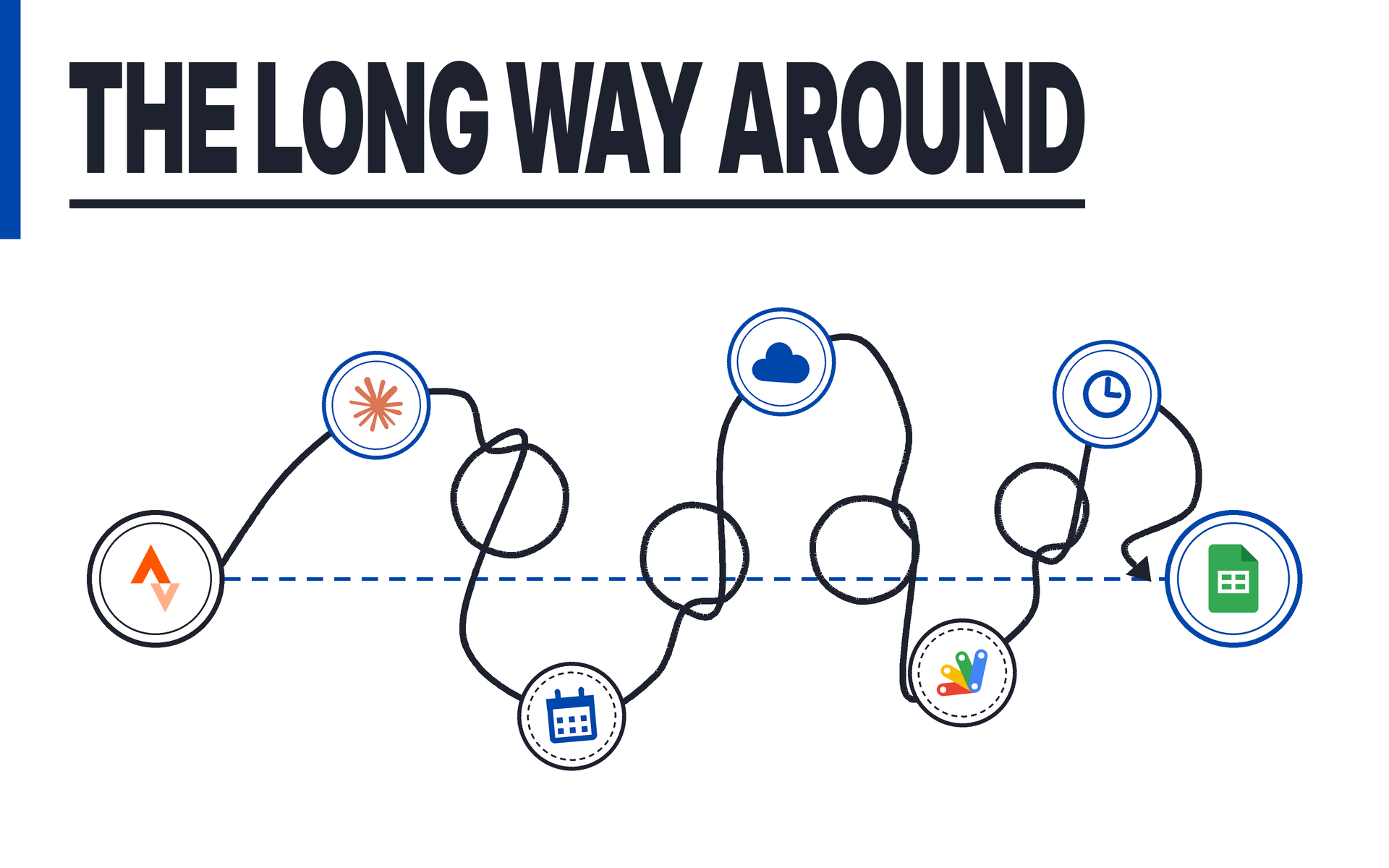
For a few years, logging a bike ride took zero effort. I’d save a ride in Strava, and not long after it was a new row in a Google Sheet. I never thought about it once.
Then it broke, and I spent a good chunk of this fall rebuilding that one step. Along the way I connected an AI model to Strava, scheduled it, moved it to the cloud, and had it carefully convert meters to miles every Sunday night. It worked. It was also complete overkill, and the fix I’m happiest with is the most boring one.
Where this started
In 2022 I put together a UX case study on Strava, looking at the app’s pain points as someone who uses it constantly. A side quest of that project was building a page for the case study on my site, and I wanted my historical cycling stats on it. If I’m going to critique an app, I want it to be obvious I’m a regular user and not someone who downloaded it last week.
The setup was simple:
- Zapier watched Strava. Every time I saved an activity, it added a row to my “Strava Ride log” Google Sheet.
- The sheet did the math. A summary tab used formulas to total my rides, miles, climbing and time.
- My site read that summary tab straight from Google every time someone loaded the page and drew a small “Personal all-time metrics” table, and it dropped my ride count into the intro paragraph.
It worked well, and for the first time I had a better view of my ride history on my own site than I did in Strava.
Strava changed the rules
On June 1, 2026, Strava posted an update to its developer program. Developers now need a Strava subscription, the athletes an app can serve are capped unless it’s approved for more, and this was the line that mattered for me: “Apps routing Strava data through third-party intermediary platforms are no longer supported.” (TechRepublic framed the whole thing as a crackdown on AI scraping ahead of a possible IPO.)
Then on August 28, Zapier emailed me. Because of Strava’s new API policy, Zapier could no longer offer triggers or searches that read data out of Strava. “New Athlete Activity,” the exact trigger my workflow ran on, was on the list of removed steps, and every Strava Zap would be turned off by September 1. The one thing that survived was Create Activity, which means you can still push data into Strava, just not pull your own back out.
My Zap ran for the last time on August 30. At least it went out on a 50-mile ride. (This wasn’t Strava’s first squeeze either; they tightened the API agreement in late 2024 too.)
The funny part is that the same June update introduced Strava’s own MCP, an official way to connect your Strava data to an AI assistant. Which is exactly where I went next.
Round one: Claude and a Sunday night task
I connected Claude to Strava and set up a scheduled task to run every Sunday evening: grab the week’s activities, convert everything into the sheet’s format and add the new rows.
The caveat was that it needed Claude running on my PC on Sunday nights, and that’s not always the case. The first version also had Claude editing the sheet through a browser window, clicking into cells one at a time (it was about as graceful as it sounds). And it was only grabbing my rides, which meant my workouts quietly stopped making it into the log.
I went back to Claude and moved the task to the cloud. It talked to Google Sheets directly, logged every activity type and ran whether my PC was on or not.
That fixed the reliability problem, but not the one that was bugging me. Every Sunday, an AI model was going to read my entire log, call Strava, do unit conversions, check for duplicates and write a handful of rows. That’s a lot of thinking (and a lot of tokens) for something Zapier did with one trigger and one action. What I wanted was my old workflow back, or something very close to it. And most importantly, it had to be free.
The free fix: Google Apps Script
Claude walked me through a different approach: a Google Apps Script that lives inside the sheet and talks to Strava’s API directly. No Zapier, no MCP and no AI on the job once it’s set up.
The catch is that you need your own Strava API app to make it work, and the page to create one is not easy to find. (It’s strava.com/settings/api, which I’m writing down for the next person who goes digging. You also need a Strava subscription to create one now.) I figured it out, connected it, and now the script checks Strava every 15 minutes and adds anything new to the log.
Strava allows 1,000 requests a day. I’m making 96. I’m good there.
It’s not quite the instant trigger Zapier had. Strava’s webhooks expect an answer within two seconds, which isn’t a great fit for Apps Script, and checking every 15 minutes is close enough that I’ll never notice. It runs on Google’s servers for free, my PC can be off, and it logs everything, workouts included.
Meanwhile, on my site
The other half of this was the site itself. I rebuilt my cycling stats with Claude this month, and it changed how the data gets from the sheet to the page.
The old way: the Strava case study page asked Google for the summary tab every single time someone visited. The sheet’s formulas did all the math, and the page showed one small table. If Google was slow, the page sat there saying “Loading stats…”
The new way: there’s now a dedicated cycling page, and the data takes a different route:
- Every morning, a GitHub Action downloads the Log tab, keeps only the rides, and a short Python script does the math: total rides, miles, climbing, time, my longest ride, my biggest climb and per-bike counts.
- It saves the results into a data file inside the site. If nothing changed, it stops there. If something did, it commits the update and the site rebuilds itself.
- The page reads that file. Nobody’s browser has to wait on Google anymore.
Because every ride is in that file (not just the totals), the page can do a lot more than one table. You can filter by year, date range or bike, sort the full ride list, and see a calendar heatmap of when I ride by month and weekday, shaded by miles, time or climbing. The filters live in the address bar, which means a filtered view can be shared as a link. As I write this, it shows 238 rides and 5,878.4 miles.
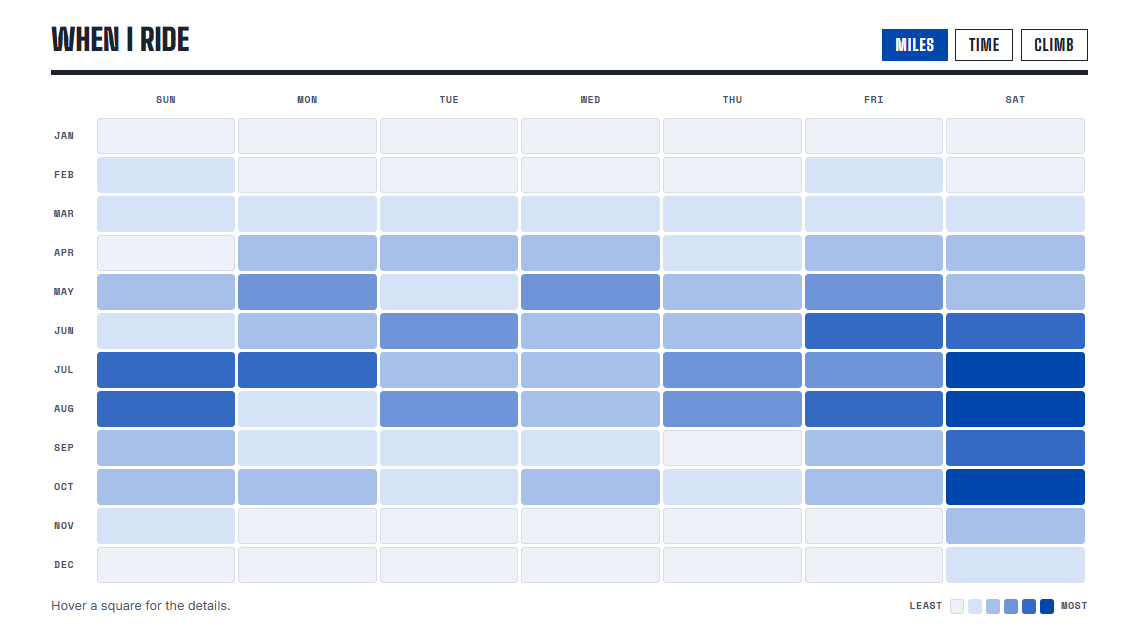
The trade-off: a new ride hits the sheet within 15 minutes, but it doesn’t show up on the site until the next morning (unless I hit “Run workflow” myself). For a stats page, I can live with that.
Overkill, and I knew it
Looking back, the new workflow to get my data turned into an over-engineered, token-heavy experience when it wasn’t before. Zapier did this with one trigger and one action. My replacement went through an MCP connection, a scheduled AI task, a move to the cloud and a Google Apps Script before it landed somewhere I was happy with.
I’m glad I found the Apps Script solution, because it wasn’t sitting well with me that I needed an MCP connection and a Claude scheduled task to do the same thing Zapier did. It was complete overkill for a simple action.
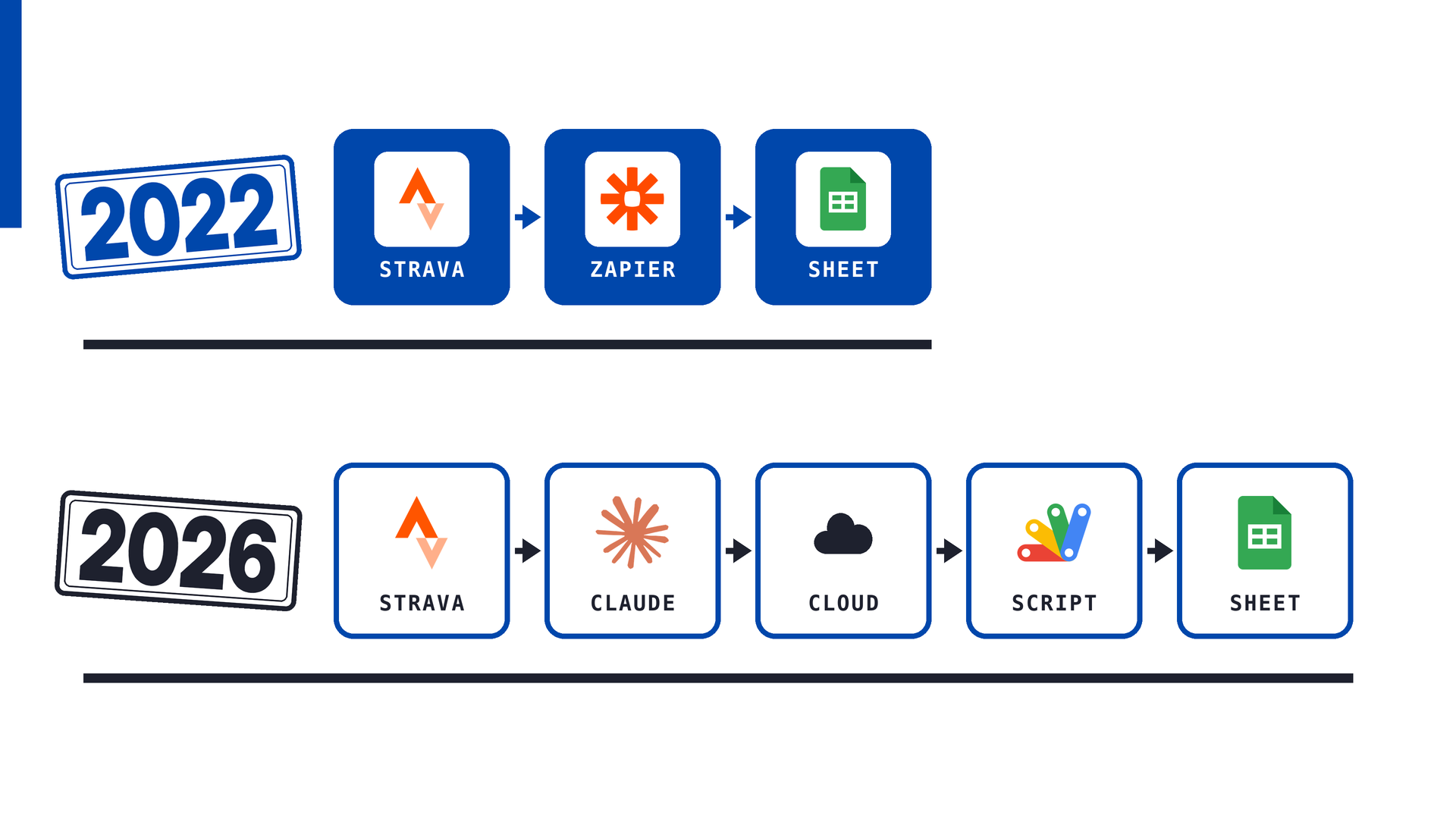
Claude was a big help getting there. It just turned out to be better at building the boring tool than at being the tool. Now I’m wondering where else I’m reaching for AI when a plain old script would do the job.
This post was produced with a Claude repurposing agentic workflow I built: I write down my raw thoughts, and AI helps turn them into this post, my social posts and the visuals. I review and edit everything before it goes live. Curious how it works? Ask me how I built it!