The Problem
The Sales team relies on sending free product samples to close deals, but the request process was a manual bottleneck. Sales Engineers (SEs) used a static PDF form that allowed for incomplete data, missing project IDs, and bypassed approval limits.
Friction
The "Data Janitor" Problem: Customer Service (CS) spent hours chasing SEs to fix errors or gather missing addresses instead of processing orders.
Shadow Spend: High-value requests often skipped the required manager approval because the "rules" lived in a policy document, not the form logic.
Zero ROI Tracking: Requests were trapped in PDFs and emails, making it impossible to correlate "Samples Sent" to "Deals Closed."
Goals
- Drive Process Transparency and Compliance: Establish a clear, auditable workflow to ensure all requests adhere to the defined approval policy, eliminating unauthorized requests and "shadow spend."
- Eliminate Manual Data Validation: Drastically reduce human interference by requiring project IDs, product IDs, prices, and customer information, and routing requests for approval based on calculated total costs.
- Enable Strategic ROI Tracking: Create a structured data pipeline that links sample requests directly to active CRM projects, providing management with clear, quantifiable insights into sample spend and closed deals.
The Product Approach
Role
Product Owner & Developer
Stakeholder Discovery
Before building a single flow, I treated this as an internal product launch. I interviewed Sales (the users), Customer Service (the processors), and Management (the approvers) to map the disconnects and align the solution with their core needs.
- Sales (The Users): Their primary requirement was speed. They were frustrated by the static PDF form that frequently led to back-and-forth communication with Customer Service regarding missing Project IDs or incomplete shipping data. The ideal state for them was a fast, frictionless process that moved their deal forward without administrative roadblocks.
- Customer Service (The Processors): Their core pain point was the "data janitor" problem. They were spending up to 30% of their time manually validating data, chasing Sales Engineers for missing information, and ensuring the request had the correct approval. Their goal was to receive "clean" and complete requests that were ready for immediate entry.
- Management (The Approvers): Their main objective was control and insight. The policy for high-value approvals was bypassed, creating "Shadow Spend." They needed a clear, auditable trail that guaranteed compliance and, most importantly, structured data that could correlate sample costs directly to successful deals for ROI analysis.
Aligning the Stakeholder Triad
The legacy process created friction because the three key groups had conflicting needs. My goal was to design a workflow that didn't just "compromise," but actually solved the core pain point for each group:
- Sales (Need: Speed) They viewed the old process as a "waste of time" that kept them from selling. They needed a frictionless way to request samples without manual paperwork.
- Management (Need: Control) They felt the old process was "leaky" and lacked oversight. They needed strict adherence to the approval hierarchy to prevent unauthorized spending and overall transparency to all requests being submitted.
- Customer Service (Need: Efficiency) This group was suffering the most. They were acting as "Data Janitors", constantly pausing their actual work to hunt down missing addresses, verify approval policies manually, and chase managers for signatures. They bore the entire mental load of communicating status updates to stakeholders.
The Solution
Front-End (Data Integrity)
I replaced the PDF with a dynamic Microsoft Form. I implemented "Required Fields" validation, forcing Sales Engineers to provide all necessary Project IDs and customer information upfront. This eliminated the back-and-forth for Customer Service.
The Logic Engine (Conditional Governance)
This was the core engineering challenge. I didn't just want a simple approval; I needed a smart logic gate. I built a Power Automate flow that:
- Calculates Value: It reads the requested items and calculates the total monetary value.
- Applies the "$1K Threshold": I engineered a conditional split:
- Under $1,000: The request is auto-approved and routed directly to Customer Care, drastically reducing cycle time for low-risk requests.
- Over $1,000: The system triggers a dynamic approval workflow. It queries the Authorization Matrix (hosted in SharePoint) to route the request to the specific Manager, Director, or C-Level executive required, based strictly on the Requestor's Role and the Total Request Value.
Back-End (The Single Source of Truth)
All requests are logged automatically to a SharePoint List. I designed the data schema to align with our ERP structure (including fields for SAP Material IDs and SD Document IDs), ensuring the data is structured correctly for manual entry now and ready for integration in the future.
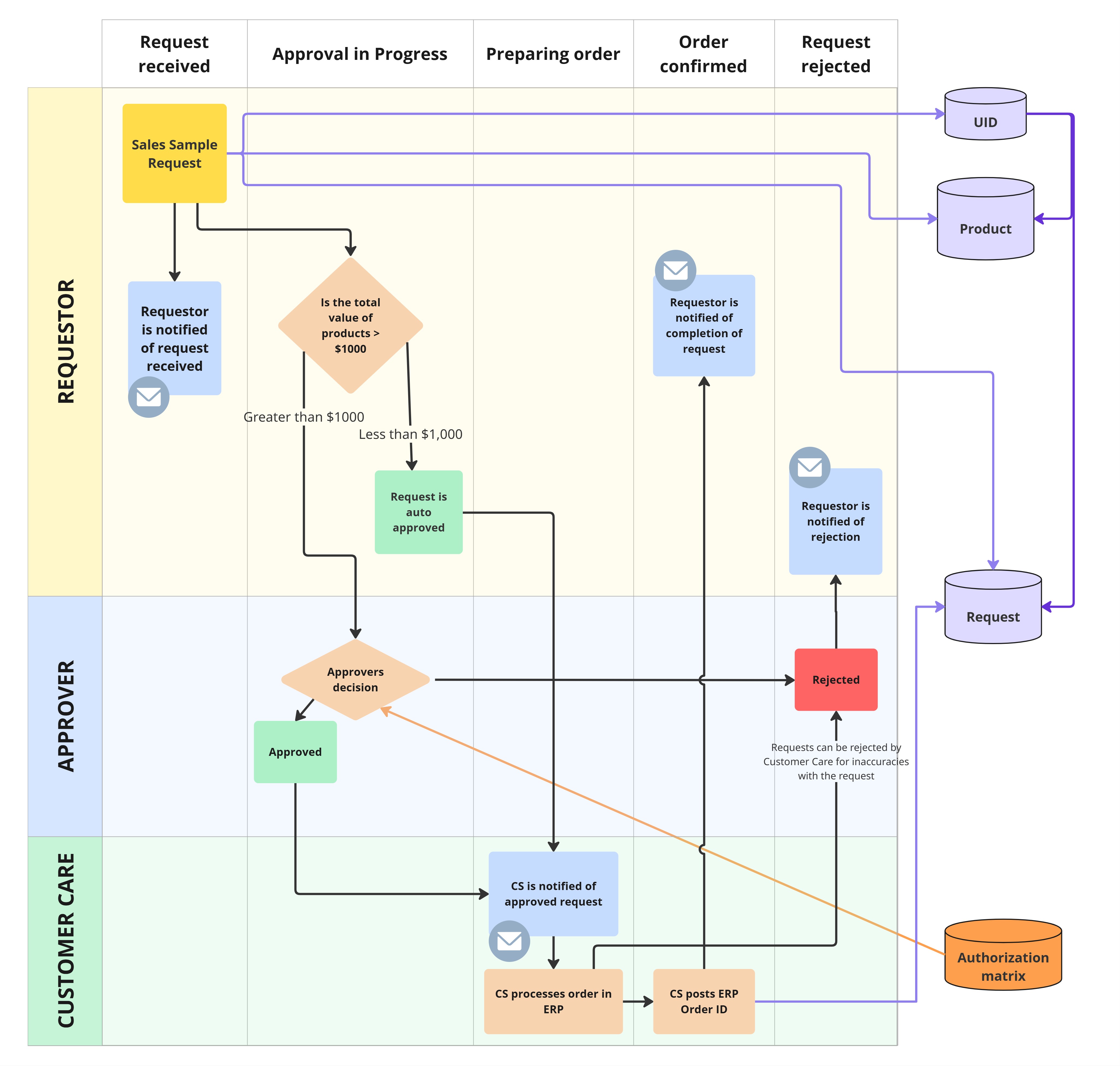
Process Flow Map
The Results
Reduced Cycle Time
The Customer Service no longer manually validates data; they receive "clean," pre-approved orders ready for entry.
100% Policy Compliance
The system prevents requests from skipping the approval hierarchy.
Data Visibility
We moved from "black box" PDF attachments to a structured database, enabling us to finally track the volume of samples against closed deals.
Future Roadmap
While the current MVP successfully standardized the workflow, Phase 2 will migrate the front-end from Microsoft Forms to a custom Power App to enable deep data integration and advanced governance.
Data Lake Integration (Automated Validation)
I will connect the Power App directly to our internal Data Lake. This will allow real-time validation of customer information, project IDs, and material IDs against the master data. Crucially, it will automatically fetch list prices, significantly reducing the number of manual fields the user needs to complete.
Role-Based Management Dashboards
I am designing a "Manager View" within the app that features Row-Level Security (RLS). This ensures data governance by filtering views based on hierarchy:
- Regional Managers will only see requests from their specific territory (e.g., US East).
- Directors will have a consolidated view of all regions under their purview.
Pipeline Velocity & Conversion Analytics
I will implement stage-tracking analytics to measure how fast opportunities move through the sales cycle after a sample is received. This view will explicitly highlight "Stalled Projects" (opportunities that failed to progress post-sample) allowing leadership to calculate the true ROI of sales samples.
Product Demand Intelligence
A separate trend dashboard will aggregate request data to visualize which product series and categories are in highest demand. This provides Product Management with data on prospective customers testing their products.